

Moved from the old dashboard
If you had Web Hosting with us before, your account has moved from the old dashboard at dash.cloudzyro.com to the console at https://console.cloudzyro.com. This page explains what’s changed and the one thing you need to do: set up payment.
What’s changed
Section titled “What’s changed”- Where you manage it. Your hosting, domains, billing and invoices are all in the console now. dash.cloudzyro.com forwards there.
- Your hosting itself hasn’t changed. Your websites, email, files and cPanel stay exactly where they were.
- Same price, same renewal date. You keep the price you paid before, including tax, in the same currency, and the same renewal date.
- One-click cPanel. Open cPanel from the console without a password. See Use cPanel.
- Payments are handled by Paddle, our payment provider, so you’ll see Paddle on your card statement.
Sign in
Section titled “Sign in”-
Click Continue with email and enter the same email address you used with the old dashboard.
-
Open the sign-in link we email you.
There’s no password to remember. You can also sign in with Google, GitHub, GitLab or Bitbucket if that account uses the same verified email address: it joins your existing account.
Once you’re in, Web Hosting lists your hosting accounts. See Get started with Web Hosting for a tour.
Set up payment
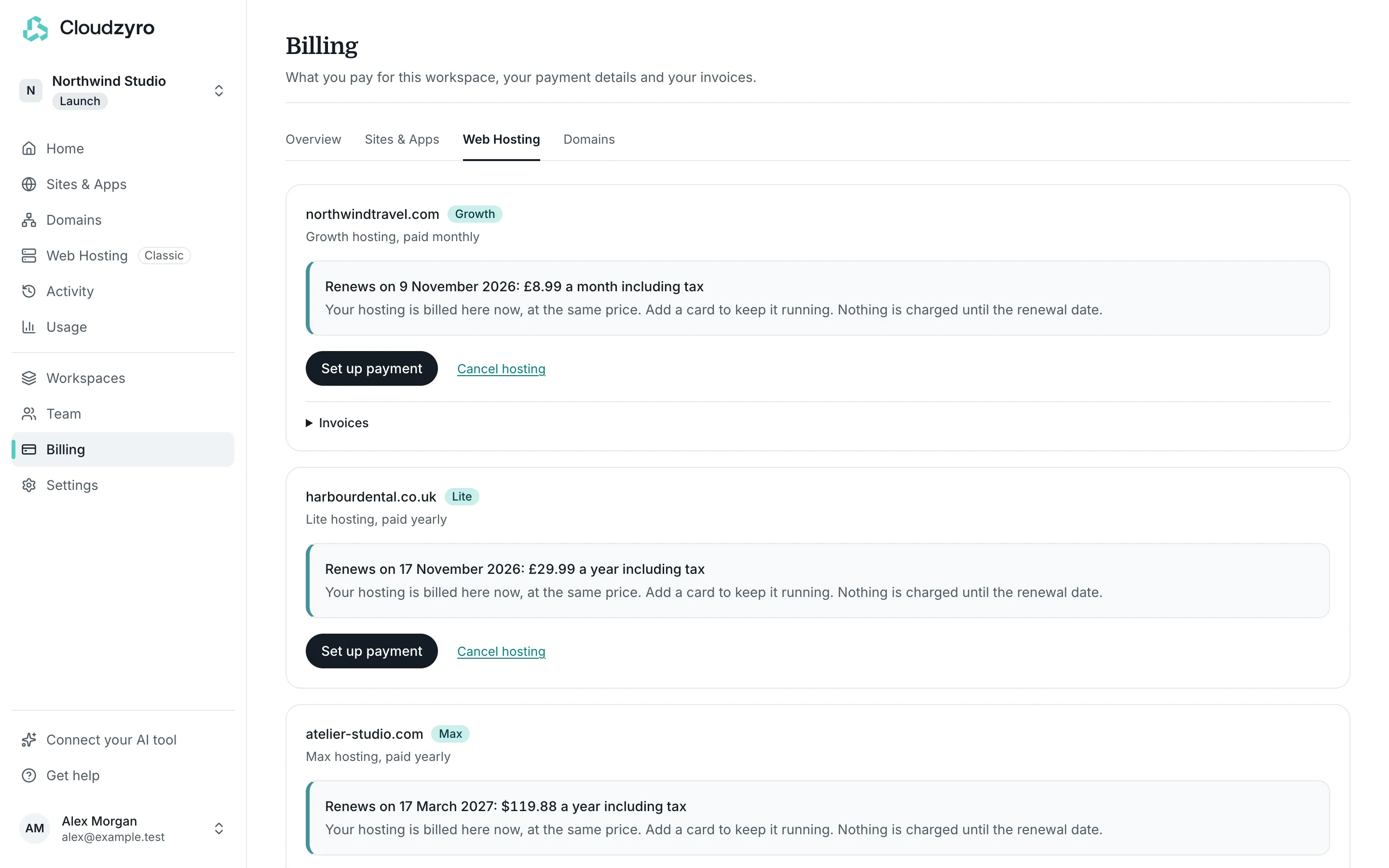
Section titled “Set up payment”Your hosting is billed in the console now, so it needs a card saved here to keep running after your renewal date.
-
In the console, open Billing, then the Web Hosting tab.
-
Find your hosting. It shows your price and renewal date.
-
Click Set up payment and enter your card in the secure checkout.
Your card is saved and nothing is charged until your renewal date. Then you’re charged your usual price, monthly or yearly as before. The checkout may describe the time until then as a free trial: that’s how it shows a first payment on a later date.
Only owners and admins of the workspace can set up payment. With more than one hosting account, set up payment on each one.
If payment isn’t set up
Section titled “If payment isn’t set up”If payment still isn’t set up 7 days after your renewal date, the hosting is suspended: its websites and email go off, but its files are kept. The date is shown in Billing.
To turn it back on, set up payment in Billing, Web Hosting. It comes back within a few minutes.
Your domains moved too
Section titled “Your domains moved too”Domains you registered with us through the old dashboard are in the console’s Domains, with their renewal dates. They keep their old yearly price, including tax.
- If you have Web Hosting, a domain renews with your hosting’s payment, charged a week before it expires. Set up payment for your hosting and there’s nothing else to do.
- If you don’t have Web Hosting, the domain needs its own renewal. Open the domain in Domains (or Billing, then the Domains tab) and click Set up renewal. We save your card and charge it a week before the domain expires.
You can turn auto-renew off for any domain you don’t want to keep.
Old invoices
Section titled “Old invoices”Invoices from the old dashboard aren’t in the console. If you need a copy of one, email support@cloudzyro.com. Payments you make from now on have their receipts and invoices in Billing. See Renew a domain or move it away.
Cancelling
Section titled “Cancelling”If you no longer need a hosting account, open Billing, Web Hosting and click Cancel hosting. It stops on your renewal date, when what you’ve paid for runs out, and nothing more is charged. Until then, your website and email work as normal, and you can change your mind with Keep hosting. If your renewal date has already passed, it stops straight away. Domains aren’t affected.
Questions
Section titled “Questions”Email support@cloudzyro.com, or use Get help in the console to chat with us.