

Choose what a domain is for
Each domain registered with Cloudzyro is used for one thing: a Cloudzyro site, your Web Hosting, or somewhere else. You choose on the domain’s page, and we set up its DNS for you. There’s no general DNS editor: records live with whatever the domain is for.
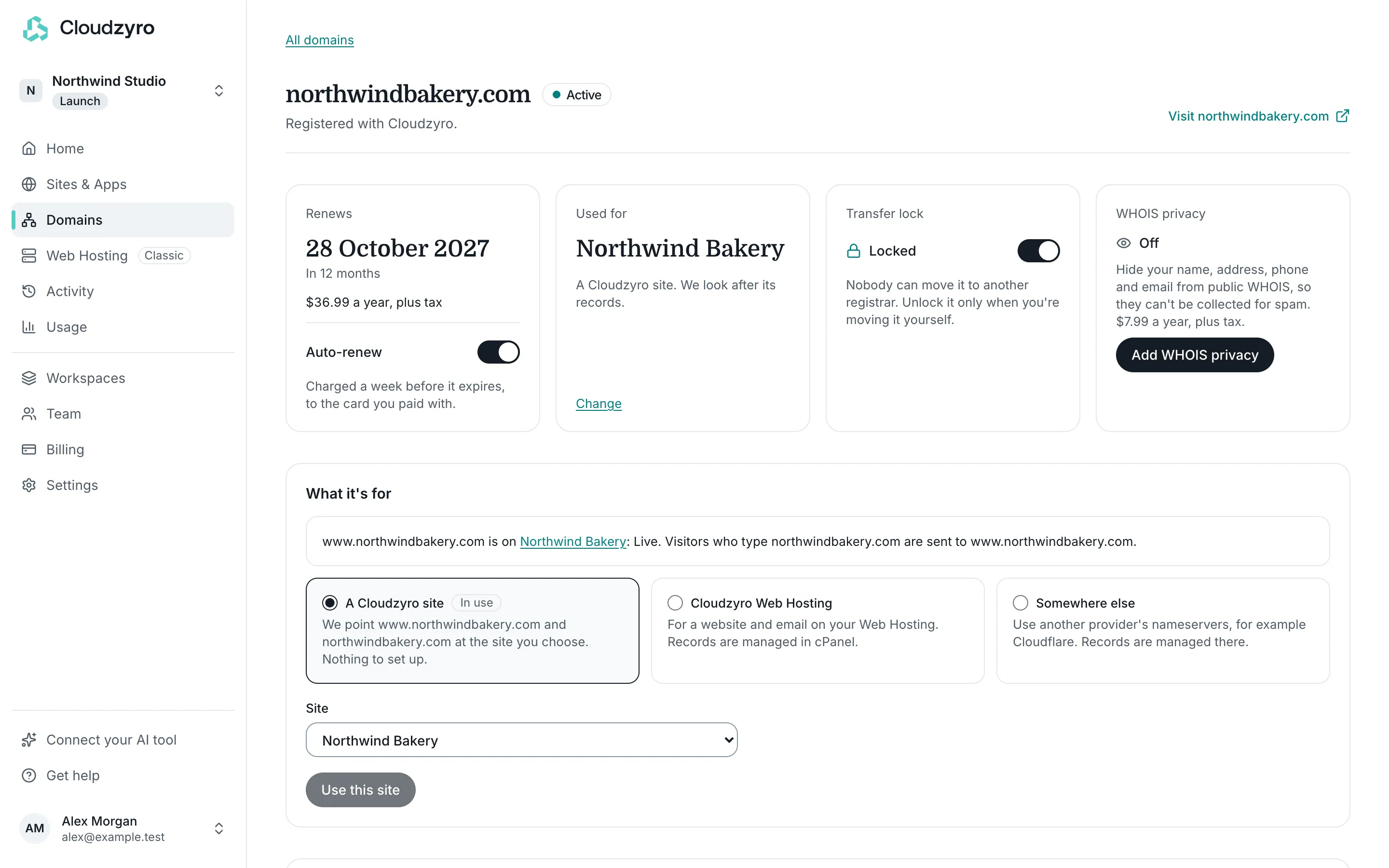
The domain’s page shows what it’s used for now in the Used for card, and the choices under What it’s for. Owners and admins of the workspace can change it.
The three choices
Section titled “The three choices”A Cloudzyro site
Section titled “A Cloudzyro site”We point www.yourdomain.com and yourdomain.com at the site you choose. Nothing to set up. Visitors who type yourdomain.com are sent to www.yourdomain.com, over HTTPS.
The page shows how it’s getting on: Waiting for DNS, Getting the certificate, then Live. It usually goes live within a few minutes, and we email you when it does.
Want email on the domain too, with a provider like Google Workspace or Microsoft 365? Add their records under Email records.
Cloudzyro Web Hosting
Section titled “Cloudzyro Web Hosting”For a website and email on your Web Hosting. The domain uses ns1.cloudzyroserver.com and ns2.cloudzyroserver.com, and its records are managed in cPanel’s Zone Editor. This choice shows only if your workspace has Web Hosting.
If the domain is already a hosting account’s domain, the page shows On your Web Hosting with the cPanel username and an Open cPanel button. If it isn’t, add it to a hosting account in cPanel (under Domains) so its website and email work there.
See Point a domain at your Web Hosting.
Somewhere else
Section titled “Somewhere else”Use another provider’s nameservers, for example Cloudflare’s. Records are then managed with that provider, and the page names it when it’s one we recognise.
Change what a domain is for
Section titled “Change what a domain is for”-
In the console, open Domains and click the domain.
-
Under What it’s for, choose A Cloudzyro site, Cloudzyro Web Hosting or Somewhere else. The current one is marked In use.
-
Fill in what’s needed:
- for a site, choose it under Site;
- for somewhere else, enter the provider’s nameservers (click Add a nameserver for more than two).
-
Read the note that appears about what will change.
-
Click Use this site or Save nameservers.
Moving a domain to a site usually takes a few minutes. Moving it to Web Hosting can take a few hours to reach everyone, and to another provider up to a day.
Before you switch
Section titled “Before you switch”- From a site to Web Hosting or somewhere else:
wwwcomes off its site. Make sure the new place has the website and email records you need first. - From Web Hosting or somewhere else to a site: the domain moves to our nameservers, so records at its current ones stop being used. If it has email, add those records under Email records straight afterwards.
- From one site to another:
wwwmoves to the new site and comes off the one it’s on now. - To somewhere else: set up the records at the new provider before you save, so there’s no gap.
Domains registered elsewhere
Section titled “Domains registered elsewhere”These choices are for domains registered with Cloudzyro. To use a domain registered elsewhere with a site, connect it with Connect external in Domains or on the site’s Domains tab: see Connect a custom domain. To use it with Web Hosting, change its nameservers where it’s registered: see Point a domain at your Web Hosting.